Pages

Showing posts with label WikiLeaks. Show all posts

Friday, October 21, 2016

Cartoons: the truth is out there -- somewhere

During this week--Wikileaks news just keeps comin'; it's beginning to look like conspiracy theorists rule the day; an informal poll recognizes that we all, that's 100%, want this election to be over; and MetLife fired Charlie Brown.

Between Russians trying to hack our confidence in the election process, Wikileaks trying to discredit Clinton; and undercover video stings (see The hacking, leaking, undercover election), what's a voter to do?
***
image: cartoon by Glenn McCoy
Glenn McCoy, The Week
***

The Washington Post Magazine reports that this is The Conspiracy Theorists’ Election. On the 40th anniversary of the Moon Landing (July 16,1969), Time Magazine looked at 10 of the most enduring conspiracy theories.
***
image: cartoon by Drew Sheneman
Drew Sheneman, The Week
***

I'm guessing we all agree on one thing:
***
image: cartoon by Tom Toles
Tom Toles, The Week
***

And MetLife fired Charlie Brown...
***
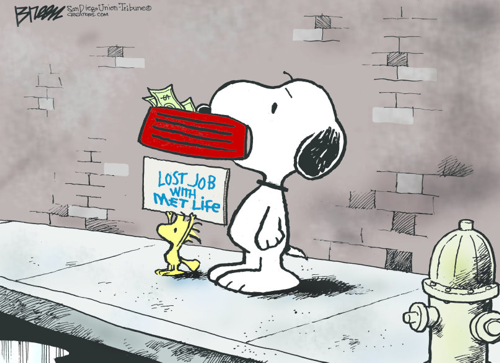
image: cartoon by Steve Breen
Steve Breen, The Week
***

A-a-nd I've been wondering: if Trump doesn't accept that he lost the election, what 's he gonna do? Show up at the White House with a moving van? Take the podium at the Inaugural? Crash a Joint Chiefs of Staff national security meeting? Just sayin'.

-- Marge


Wednesday, December 16, 2015

DIY: a public domain Christmas

image: digital reproduction of Thomas Nast's "Merry Old Santa Claus" (1881)
Thomas Nast’s most famous drawing, “Merry Old Santa Claus”,
from the January 1, 1881 edition of Harper’s Weekly. Public Domain Review
***
The simple act of sharing a digital book can become complicated in this patent- and copyright-bound age. If a book, story, poem, or film is public domain, you can use and/or alter the material in any way you chose. This is especially helpful if you create websites, digital art, or publish videos. Keep in mind there's a strong line between offering what you create for personal use and monetizing it. Also, if your creation uses elements of another artist's/entity's creation or alters it, the original artist has a right to say how his/her creation is used. Shepard Fairey got in trouble for his use of Mannie Garcia's photo for his Barack Obama Hope poster. Using public domain pieces just works better.

To get started with finding public domain information, take a look at How to Celebrate a Public Domain Christmas at wikiHow. While the article goes a little overboard--you can use any image you want in your own home--it gives some ideas on finding pieces that are in the public domain. But do take care when you make something available to the general public.

For a list of free Christmas plays and stories, there's 10 classic Christmas stories, free to download. A helpful feature of this article is the reference to Project Gutenberg. Something I just learned: "Project Gutenberg is facilitating online publishing by contemporary authors." I also learned that there's a site called WikiLeaks: "WikiLeaks is a not-for-profit media organisation. Our goal is to bring important news and information to the public. We provide an innovative, secure and anonymous way for sources to leak information to our journalists..."

An interesting site that offers pieces in the public domain is The Public Domain Review. In the Collections section many sources are named and content made available. Some of the pieces are the digitized form of documents and works of art that are centuries old. Careful, some of the images can be disturbing. You can select what to view by medium or era.
***
image: photo of Ellis Island Immigrants, 2 Dutch children
Ellis Island immigrants, Dutch children, Public Domain Review
***

Finding background music for videos can be time-consuming. Google's Audio Library offers a very nice selection with descriptions including the genre and mood. Also included are precise notes on fair use/rights. You can find this library by logging into your YouTube account and choosing "My Channel" in the upper left menu. Then choose "Video Manager" from the bar above your YouTube banner. Along the left side of the page is a list with "Create" at the bottom. The Create dropdown includes "Audio Library" and "Video Editor." Once on the Audio Library page there are several options to filter its contents. You can download the audio sample selected.


--Marge